MediumProblem 19 of 36 in the system design series
Design a Price Tracker: Price History and Drop Alerts at Scale
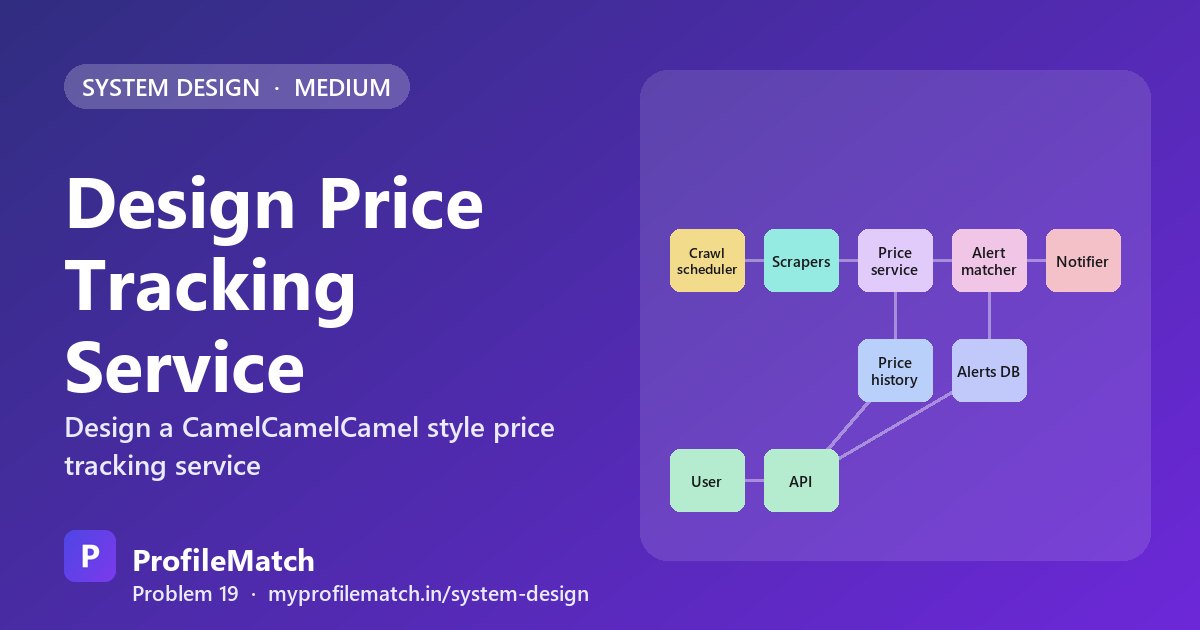
A price tracker watches product pages on online stores, records every time a price moves, and pings a shopper when an item falls below the amount they are willing to pay. From the outside it looks like a small utility: a chart and an email. Underneath, it is a crawler, a time-series archive and an event-matching engine glued together, each running at a scale of hundreds of millions of items.
Interviewers like this question because it tests whether you can separate three workloads that behave very differently. Collecting prices is a scheduling and politeness problem against websites you do not control. Keeping history is a storage-cost problem that grows forever. Firing alerts is a lookup problem that has to stay fast even during a festival sale when thousands of prices tumble at once.
The trap is treating every price check as an event worth storing and every alert as something to scan. A strong answer notices early that almost all checks return the same number, and builds the whole pipeline around the small stream of genuine changes.
This is an interview practice design for a Price Tracking Service-like service, built from first principles. It is not a description of how Price Tracking Service is actually built.
Functional Requirements
The product boils down to three user stories. A shopper drops in a product URL and the system begins monitoring it; that one action is also how new products enter the catalogue, so tracking and onboarding are the same flow. Anyone visiting a product can then open a chart covering the past month, the past year or the full recorded lifetime of that item.
The third story is the reason people install a tracker at all: set a target such as ₹1,499 and receive an email or push message when the price reaches it. Checkout, coupon codes and cross-store comparison are deliberately excluded. Saying this out loud keeps the interview focused on the hard parts and shows you can scope a problem before drawing boxes.
Track a product
Paste a product link, and we start watching its price.
product URL
Price history chart
See how the price moved over months and years.
1M · 1Y · all time
Price-drop alert
Set a target price; get an email or push when it's hit.
target price
- Out of scope today: buying, coupons and price comparison across shops
Non-Functional Requirements
Freshness is not uniform. A phone with fifty thousand watchers deserves a check roughly every hour, while an obscure cable that nobody has opened in months can be refreshed far less often. Writing this as a requirement up front justifies the priority scheduler that appears later in the design.
Alert latency matters because deals expire. If a lightning offer lasts twenty minutes, an alert delivered an hour late is worse than useless, so the goal is to notify within about five minutes of detecting the drop. Politeness is a hard constraint rather than a nice-to-have: hammer a retailer and you get rate limited or banned, which destroys freshness for every product on that site. Finally, history must be stored cheaply, because the archive only ever grows and nobody deletes old prices.
Fresh where it matters
Popular products checked hourly; the long tail can wait.
by popularity
Timely alerts
Once a drop is seen, the user hears within minutes.
< 5 min
Polite crawling
Respect each retailer's rate limits and terms.
rate limits
Cheap long history
Years of prices for every product, at low cost.
time-series
Scale Estimation
Assume roughly 100 million tracked products. Because popular items are refreshed many times a day and the long tail only occasionally, a reasonable blended figure is about 500 million checks per day, which works out to around 6,000 checks per second sustained. That number sizes the scraper fleet and the per-retailer queues.
The more important figure is how few of those checks change anything. If we assume only 50 million real price movements per day, and each stored point is about 20 bytes, history grows by roughly 1 GB a day, which is trivial. Add around 200 million active alerts and the shape of the system becomes clear: the read side of crawling is huge, the write side of history is small, and every one of those 50 million changes needs a quick answer to "which alerts did this just satisfy?"
100million
Products tracked
500million
Price checks per day
≈ 6K checks / s
50million
Price changes per day
× 20 B ≈ 1 GB / day
200million
Active alerts
Checks ≫ changes → store only changes, match each one to alerts
Core Entities & API
Four entities cover the domain: a Product, a Price point (one price at one timestamp), an Alert, and the User who owns alerts. Keeping price points as a separate entity rather than a column on the product is what lets history scale independently.
The chart is served by GET /products/{id}/prices?range=1y, returning an ordered list of timestamp and price pairs; the range parameter lets the server pick raw data or rollups. Creating an alert uses POST /alerts with the product URL, the target price and a delivery channel. Accepting a URL instead of a product ID is intentional: if the item is unknown, the same call registers it for crawling. DELETE /alerts/{id} removes an alert and returns 204.
Core entities
ProductPrice pointAlertUser
API
- GET /products/{id}/prices?range=1y→ [ { ts, price } ]
- POST /alerts { product_url, target_price, channel }→ { alert_id }
- DELETE /alerts/{id}→ 204 removed
High-Level Design
The design splits into a write pipeline and a user-facing path. In the pipeline, a crawl scheduler holds a priority queue of products keyed by when each one is next due. It hands work to scrapers, which fetch pages while obeying limits configured per retailer. Their output flows into a price service that parses the page, compares the result with the last known value, and discards anything unchanged.
Genuine changes go two ways. They are appended to the price history store, and if the movement is downward they are sent to an alert matcher. The matcher queries an alerts database organised by product and target, then passes winners to a notifier that sends the message and flags the alert as delivered. On the user side, a thin API reads history for charts and writes new alerts. Because the two paths share only storage, a slow crawler never slows chart loading.
Deep Dive 1 — Price Ingestion at Scale
Hitting 6,000 checks per second without getting blocked comes down to spending the crawl budget wisely. Products that carry alerts or get frequent views are scheduled hourly; the long tail drifts to daily or weekly. On top of popularity, the scheduler watches volatility. An item whose price jumps around every few hours gets pulled forward, while one that has been flat for a month backs off. Storing a next-check timestamp on each product makes this a simple ordered queue.
Each retailer gets its own queue and token bucket, so a store that throttles aggressively only slows its own products. Wherever possible, prefer structured sources such as affiliate or catalogue APIs, which are cheaper and more reliable than parsing HTML. A browser extension that reports prices shoppers are already seeing adds free freshness for busy items, but those reports are untrusted input: a value far outside the recent range should trigger a verification crawl before it is recorded.
Prioritise by popularity
Products with alerts and views: hourly. The long tail: daily or weekly.
Adapt to volatility
Price moves often? Check sooner. Unchanged for weeks? Back off.
One queue per retailer
Each retailer gets its own rate limit, so one site never blocks the rest.
Official APIs and feeds first
Affiliate and product APIs give prices without scraping pages.
Crowdsourced prices
A browser extension reports prices users see; outliers are checked.
Deep Dive 2 — Price History Storage
A single relational table of product, timestamp and price is the obvious start, and it works for a while. Several years in, the row count reaches the billions and the indexes keep swelling, so queries and maintenance both get slower. A wide-column store partitioned by product and clustered by time fixes write scaling and makes each chart a single partition read, but downsampling and expiry become code you have to write and operate.
A time-series database is the better fit. Data of the form (product_id, ts, price) compresses extremely well, and continuous aggregates plus retention policies come built in. Rows are written only on change, while the last-checked time sits on the product record so we still know the data is current. For anything older than a year, keep a daily minimum, maximum and closing price. A multi-year chart looks identical to users, yet the stored footprint shrinks dramatically.
Plain SQL table
- + Simple, familiar
- − Billions of rows
- − Indexes keep growing
Wide-column store
- + Partition by product
- + Scales writes
- − No rollups built in
Time-series DBChosen
- + Heavy compression
- + Rollups + retention
- − One more special store
- Row = (product_id, ts, price) · written only when the price changes
- Older than a year → keep daily min / max / close
Deep Dive 3 — Matching Alerts
With 200 million alerts, scanning them on every change is impossible, so the layout does the work. Alerts are partitioned by product ID and ordered by target price, which places every watcher of one item side by side in sorted order. Suppose a phone falls from ₹1,999 to ₹1,499. The only alerts newly satisfied are those with targets between those two numbers, so a single bounded range read returns exactly the set to fire. An alert whose target is already met at creation time fires immediately instead of waiting.
Each alert is marked fired once sent, so a price that bounces between ₹1,499 and ₹1,599 does not spam the same person repeatedly. Big sale events are the stress case: a popular product might match a million alerts in one drop. Rather than notifying inline, the matcher pages through the range and enqueues batches, letting the notifier drain them at a pace that email and push providers accept.
- 1Index by productAlerts partitioned by product, sorted by target price
- 2Price dropsOld price ₹1,999 → new price ₹1,499
- 3One range scanFire targets between new and old price only
- 4Fire onceMark alert fired so it never repeats
- 5Batch hot productsBig sale? Page through alerts into a queue
Trade-offs
Every choice here gives something up. Checking more often catches short-lived deals but burns crawl budget and raises the chance of being blocked, so freshness is rationed by popularity. Writing only changes keeps history tiny, at the cost of tracking the last-checked time somewhere else so a flat line is not mistaken for stale data.
Crowdsourced prices are fresh and free but need validation before anyone acts on them, since a buggy extension or a bad actor could otherwise trigger false alerts. Rolling up old data saves storage while sacrificing hour-level detail for older periods, which few users ever look at. The pattern to remember is: prioritise the crawl, persist movements rather than observations, and let a sorted index turn alert matching into one range read.
Freshness vs crawl cost
Checking more often catches more deals, but costs more and risks being blocked.
Store changes, not every check
Tiny storage — but keep last-checked time separately.
Crowdsourced prices
Free and fresh — but must be validated before we trust them.
Rollups for old data
Cheap storage — but we lose exact hour-by-hour detail.
Crawl by priority. Store only changes. Match alerts with one range scan.
Key takeaways
- Checks vastly outnumber changes, so persist only real price movements and keep last-checked time on the product.
- Schedule crawls by popularity and volatility, with a separate rate-limited queue for each retailer.
- A time-series store with rollups keeps years of history cheap; older data becomes daily min, max and close.
- Sort alerts by target price per product so a drop needs a single range scan between old and new price.
- Mark alerts as fired and batch huge matches through a queue to survive big sale events.
Interview questions
How does a price tracker decide how often to check a product?
It combines demand and volatility. Products with many alerts or page views are scheduled roughly hourly, while rarely viewed items are checked daily or weekly. If a price has been moving frequently, the next check is brought forward; if it has been flat for weeks, the interval grows. Each product stores a next-check time, and a priority queue hands the earliest due items to scrapers, subject to each retailer's rate limit.
What database should store years of product price history?
A time-series database suits it best because the data is append-only, keyed by product and time, and compresses very well. Built-in rollups and retention policies let you keep raw points for recent months and daily min, max and close values for older periods. A wide-column store also works but requires you to build downsampling yourself, while a plain SQL table struggles once it reaches billions of rows.
How do you match price-drop alerts efficiently when millions exist?
Store alerts grouped by product and sorted by target price. When a price falls from an old value to a new one, only alerts with targets between those two prices have just been crossed, so one range scan finds them all. Mark each as fired to avoid repeats, and for very popular products page through results and push them to a notification queue in batches.
Why store only price changes instead of every price check?
Most checks return the same price as last time. Assuming 500 million checks but only 50 million changes per day, writing every observation would multiply storage tenfold with no new information. Recording only changes keeps growth near 1 GB per day. The trade-off is that you must keep a separate last-checked timestamp so the system and users can tell a stable price from stale data.
How do you scrape retailer websites without getting blocked?
Give each retailer its own queue and rate limit so traffic to one site never exceeds what it tolerates and a slow site does not hold up others. Prefer official affiliate or product APIs where available, since they return structured prices without loading pages. Spend crawl budget on popular and volatile items, and supplement with prices reported by a browser extension after validating outliers.
Keep practising
- Learn the building blocks in the free system design course.
- Rehearse answers with system design interview questions.
- See which open jobs fit your skills: upload your resume.