HardProblem 26 of 36 in the system design series
Design an Ad Click Aggregator: Exact Counts at Streaming Speed
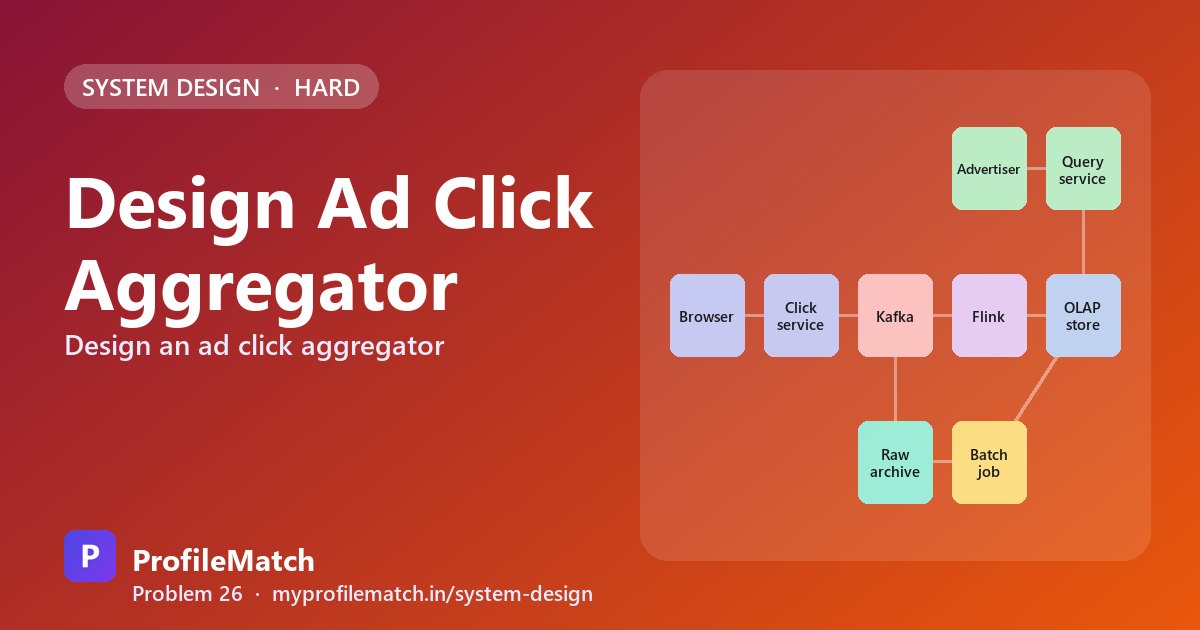
An ad click aggregator sits between the moment someone taps an advertisement and the report an advertiser checks the next morning. It sends the user on to the landing page, captures the click as an event, and rolls those events up into per-ad totals that can be sliced by minute, hour or day.
The question shows up in interviews because it blends three topics that rarely appear together: a latency-sensitive redirect, a high-volume streaming pipeline, and an analytics store that must answer range queries quickly. It also has money attached. Advertisers are billed on these numbers, so a counting bug is a financial dispute rather than a cosmetic glitch.
The tension is between freshness and correctness. Streaming gives near-live counts but can stumble on late, retried or duplicated events, while batch recomputation is accurate but slow. The design that holds up uses both, and keeps the query path completely isolated from raw click volume.
This is an interview practice design for a Ad Click Aggregator-like service, built from first principles. It is not a description of how Ad Click Aggregator is actually built.
Functional Requirements
Four capabilities define the product. A click must forward the user to the advertiser's landing page, typically via an HTTP 302. That same click must be recorded with the ad it belongs to, a timestamp and some identity of the clicker. Advertisers then need to read click totals per ad at one-minute resolution, over any window from the past hour to the past year.
Leaving out ad selection, targeting and invoicing keeps the scope honest. Those systems consume the counts we produce, but none of them change how clicks are captured or aggregated. Declaring them out of scope early frees time for the pipeline and storage questions where the real difficulty lives.
Click & redirect
A click on an ad takes the user to the advertiser's site.
302 redirect
Record every click
Each click is captured with its ad, time, and user.
click event
Query click counts
Advertisers see clicks per ad, per minute.
per ad · per minute
Any time range
From the last hour up to the last year.
minute · hour · day
- Out of scope: ad serving, targeting, and billing itself
Non-Functional Requirements
Dashboards should render in well under a second even for a year-long range, which rules out any approach that touches raw events at read time. Freshness matters too: advertisers watching a campaign launch expect a click to be reflected within roughly a minute, so a nightly batch alone would not be enough.
Accuracy is the requirement that shapes everything else. Since spend is calculated per click, losing an event under-bills and counting it twice over-bills, and both erode trust. Finally, the traffic is bursty and global, with peaks around 50,000 clicks per second, so every stage needs a buffer that absorbs spikes without dropping data.
Fast queries
Dashboards load in well under a second.
< 1 s
Fresh data
A click shows up in the counts quickly.
≈ 1 minute
Accurate counts
No lost clicks and no double counting.
money depends on it
Scale
Huge, spiky click traffic from the whole internet.
50K / s peak
Scale Estimation
Assume one billion clicks per day. Spread evenly that is about 12,000 per second, but traffic clusters around events and time zones, so plan for peaks near 50,000. At roughly 200 bytes per event, raw storage grows by about 200 GB a day, which adds up to tens of terabytes per year. That volume is cheap to archive in object storage but expensive to scan.
The figure that drives the design is about ten million active ads, each viewable at minute granularity. Counting raw clicks whenever a dashboard opens would mean scanning billions of rows per request. The only workable approach is to compute per-minute totals as clicks arrive and have queries read those small, precomputed rows instead.
1billion
Clicks per day
12K avg
Clicks per second
≈ 50K at peak
200GB / day
Raw click data
200 B per click
10million
Active ads
each queried by minute
Pre-compute per-minute counts → never count raw clicks at query time
Core Entities & API
Three entities are enough. The Ad holds the destination URL. The click event is the immutable raw record with ad ID, impression ID, timestamp and user. The minute count is the aggregated row keyed by ad and minute, and it is what the read path serves.
The redirect endpoint, GET /click/{ad_id}?imp={imp_id}, logs the event and answers with a 302 to the advertiser's URL; the impression ID becomes important for deduplication. The reporting endpoint, GET /ads/{ad_id}/metrics, accepts a start, an end and a granularity, and returns an array of time buckets with click totals. Keeping write and read paths on separate endpoints lets each scale independently.
Core entities
AdClick eventMinute count
API
- GET /click/{ad_id}?imp={imp_id}→ 302 to advertiser URL
- GET /ads/{ad_id}/metrics ?from, to, granularity=minute→ [ { minute, clicks } ]
High-Level Design
The click service does as little as possible on the hot path: it publishes the event to Kafka and immediately returns the redirect, so the person clicking never waits on analytics. Kafka is keyed by ad ID and acts as a durable shock absorber; if downstream consumers slow down, events queue up instead of being dropped.
A Flink job consumes the topic, maintains one-minute counters per ad, and writes completed windows into a columnar OLAP store such as ClickHouse or Pinot. In parallel, a separate consumer archives every raw event to S3. An hourly Spark job recounts from that archive and overwrites any minute where the streaming total disagrees, so the archive acts as the ledger of record.
Advertisers reach a query service that reads only from the OLAP aggregates, never from Kafka or S3. Separating roles this way means the fast path can be slightly imperfect for a few minutes, the batch path eventually makes it exact, and dashboard latency stays independent of how many raw clicks exist.
Stream for speed · batch for truth · queries only touch aggregates
Deep Dive 1 — Stream Aggregation
Keying Kafka on ad ID guarantees that every click for a given ad lands in one partition, so a single Flink subtask owns that ad's counters and no cross-machine merge is needed. Within the subtask, tumbling one-minute windows keep a tiny counter per ad per minute in memory, which is cheap even across millions of ads.
Windows are assigned by event time, the moment the click happened, rather than when it reached the server. A mobile client that buffers a click for thirty seconds should still credit the correct minute. Watermarks let Flink hold a window open for a short grace period, say a minute, before finalising it; anything arriving after that is left for the batch recount to fix.
When a window closes, its totals are upserted into the OLAP store keyed by ad and minute. Periodically, Flink checkpoints its consumed offsets together with all in-flight window state. After a crash it rewinds to that consistent snapshot, so counts resume as if nothing happened rather than restarting from zero or skipping ahead.
- 1Partition by ad IDKafka key = ad_id; one ad's clicks stay together
- 21-minute windowsFlink keeps a running count per ad per minute
- 3Event timeBucket by click time; watermarks wait for late events
- 4Flush to OLAPWhen a window closes, upsert its counts
- 5CheckpointSave Kafka offsets and window state together
- Clicks later than the allowed lateness are fixed by the batch job
Deep Dive 2 — Counting Exactly Once
Exactly-once counting starts before the click. When an ad is rendered, the server attaches a signed impression ID, and the click endpoint verifies that signature. Fabricated or tampered IDs are rejected outright, which blocks the simplest form of click fraud and gives every legitimate click a natural deduplication key.
Flink keeps recently seen impression IDs in keyed state with a time-to-live, so a double tap or a browser retry is discarded instead of incrementing the counter. Because offsets and state are restored as a pair after failure, replaying a stretch of the topic cannot inflate totals. The sink is idempotent as well: upserting the row for a given ad and minute twice leaves the same value.
Even with all of that, edge cases slip through, such as events later than the watermark allows. The hourly Spark job recomputes totals from the raw archive and replaces any minute that differs. This reconciliation is what lets the team state with confidence that billed numbers match the underlying events.
Signed impression ID on every ad
Issued when the ad is shown; forged IDs are rejected at the click service.
Dedup by impression ID
Seen IDs kept in Flink state with a TTL; a repeat click is dropped.
Exactly-once inside Flink
Offsets and state restore together, so a replay never double counts.
Idempotent writes
Upsert by (ad_id, minute); writing a window twice gives the same row.
Hourly batch reconciliation
Spark recounts raw clicks from S3 and overwrites any minute that is off.
Deep Dive 3 — Fast Queries
Querying raw clicks directly offers unlimited flexibility, but a year-long chart would scan billions of rows and take seconds or minutes. Storing aggregates in Postgres is familiar, yet range scans across millions of ads and long time spans degrade quickly on a row-oriented engine.
A columnar OLAP database with rollups is the chosen option. Minute rows are retained for about thirty days, then compacted into hourly and daily rows that are kept for years. A one-year daily chart for one ad touches only 365 rows. Partitioning tables by day and sorting by ad_id means each query reads a narrow slice of disk, and caching popular dashboard queries for a few seconds absorbs refresh storms when many viewers open the same report. The extra operational burden of another datastore is worth it here.
Query raw clicks
- + Fully flexible
- − Scans billions of rows
- − Seconds to minutes
Counts in Postgres
- + Simple, familiar
- − Slow on big range scans
OLAP + rollupsChosen
- + Columnar, ms queries
- + Minute → hour → day
- − One more system to run
- Minute rows kept 30 days; hour and day rows kept for years
- Partition by day, sort by ad_id → a query reads a tiny slice
- Cache popular dashboard queries for a few seconds
Trade-offs
Running both a streaming and a batch pipeline doubles the code to build, deploy and monitor, but it is the only way to get answers that are both fresh and auditable. The watermark length is a dial: waiting longer makes streaming totals more accurate, while waiting less makes dashboards feel more live.
Pre-aggregating by ad and minute makes reads very fast, but any new breakdown, such as by country or device, has to be added to the pipeline ahead of time. For a single viral ad that overwhelms one partition, salting the key across several sub-keys spreads the load, at the cost of a merge step that sums the partial counts before serving.
Stream + batch
Fresh and correct — but two pipelines to build and run.
Waiting for late clicks
Longer wait = more accurate stream counts, but less fresh dashboards.
Pre-aggregation
Fast queries — but only for the dimensions we chose up front.
Salting hot ads
Spreads a viral ad across partitions — but needs a merge step.
Stream for speed. Batch for truth. Aggregates for queries.
Key takeaways
- Return the redirect immediately and publish the click to Kafka, so users never wait on analytics.
- Assume about 12K clicks per second on average and 50K at peak; precompute per-minute counts per ad.
- Use event-time windows with watermarks, and checkpoint offsets and state together for exact recovery.
- Signed impression IDs give each click a dedup key and block forged clicks at the edge.
- Stream for fresh numbers, batch-recount from S3 for correct ones, and serve only rolled-up aggregates.
Interview questions
How do you count ad clicks exactly once?
Attach a signed impression ID when the ad is shown and require it on the click. The stream processor keeps recently seen IDs with a time-to-live and drops repeats. Checkpointing Kafka offsets together with window state prevents double counting on replay, upserts keyed by ad and minute make writes idempotent, and an hourly batch recount from the raw archive corrects anything that slipped through.
How do you handle a viral ad that creates a hot partition?
Salt the partition key so clicks for that ad are spread across several sub-keys, for example the ad ID with a suffix from 0 to 9. Each sub-key is counted on a different worker, and the ten partial totals are summed before being written or served. Salting can be applied only to ads detected as hot so the rest of the pipeline stays simple.
Why not increment a Redis counter for every ad click?
A plain counter has no memory of which clicks it has already seen, so client or network retries inflate totals. It also discards the raw events, which means there is nothing to audit when an advertiser disputes a bill and no way to recompute a minute that went wrong. Durable raw events plus aggregation keep the numbers both fast and verifiable.
What happens to clicks if the stream processor goes down?
Nothing is lost, because Kafka retains every event independently of its consumers. When the stream job restarts, it restores its last checkpoint, rewinds to the matching offsets and reprocesses the backlog until it has caught up. Dashboards may lag for a few minutes during recovery, but final counts are unaffected, and the batch reconciliation provides a second safety net.
How do ad dashboards query a year of click data quickly?
They never touch raw events. Per-minute totals are stored in a columnar OLAP database and rolled up into hourly and daily rows as they age. A year-long chart reads a few hundred precomputed rows per ad, the tables are partitioned by day and sorted by ad ID to limit disk reads, and frequently requested results are cached briefly.
Keep practising
- Learn the building blocks in the free system design course.
- Rehearse answers with system design interview questions.
- See which open jobs fit your skills: upload your resume.