MediumProblem 15 of 36 in the system design series
Design YouTube: Video Upload, Transcoding and Global Streaming
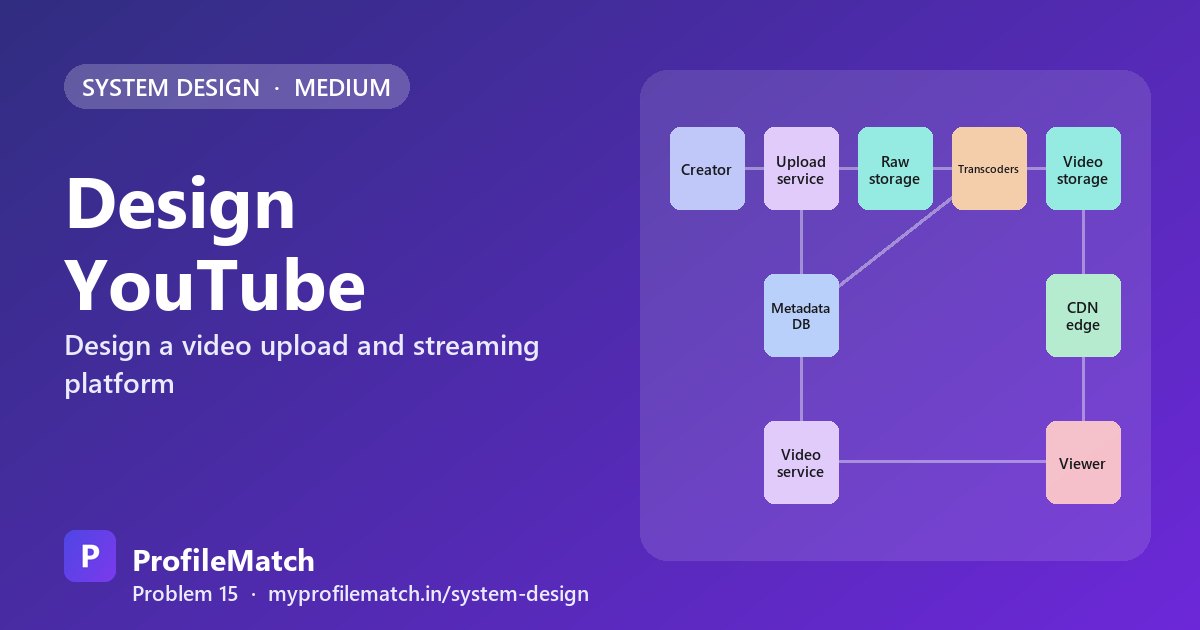
A video sharing platform has two very different halves. On one side, creators push large raw files into the system and expect them to come out as polished, playable videos. On the other, billions of viewers press play on phones, laptops and TVs and expect the picture to appear almost instantly and keep going without stalls. This article designs a YouTube-like service for interview practice, not a reconstruction of any real company's internals.
The question is popular because it tests whether a candidate can spot where the real cost lies. Storing metadata is easy. Moving enormous files reliably, converting them into many formats, and shipping tens of terabits per second to viewers around the world is not. A strong answer separates the upload pipeline from the playback path and optimises each for its own constraints.
The hardest pressures are reliability on the way in and bandwidth on the way out. Uploads must survive flaky mobile connections, processing must turn long films around in minutes, and playback must adapt to whatever network the viewer happens to be on at that moment.
This is an interview practice design for a YouTube-like service, built from first principles. It is not a description of how YouTube is actually built.
Functional Requirements
Creators need to upload videos that may be many gigabytes, frequently over unreliable connections, so the upload path has to tolerate interruptions. Viewers need to watch any published video smoothly on any device, which means the same content must work on a small phone screen and a 4K television.
That leads directly to the third requirement: every video should exist in several qualities, from 240p up to 4K, so a player can pick what the screen and network can handle. Each video also gets a page with its title, description, view count and processing status. Recommendations, comments, live streaming and advertising are each large systems in their own right and are deliberately left for another discussion.
Upload a video
Creators upload large files, even on weak networks.
many GB per file
Watch a video
Viewers stream smoothly on any device and network.
phone · TV · web
Multiple qualities
Every video is available from 240p up to 4K.
240p … 4K
Video page
Title, description, view count and status.
metadata
- Out of scope today: recommendations, comments, live streaming, ads
Non-Functional Requirements
Playback quality drives most decisions. A target of under two seconds to first frame, with rare rebuffering, is what keeps viewers from leaving. Durability matters just as much on the creator side: once an upload is confirmed, losing it is unacceptable, so originals belong in highly durable object storage with replication.
Performance must be global. Someone in a small town far from any data centre should get the same smooth experience as someone next to one, which hints strongly at edge caching. In contrast, processing is allowed to be eventual. A creator can wait a few minutes after upload before the video goes live, and that relaxation is what lets the transcoding pipeline run as asynchronous background work rather than on the request path.
Smooth playback
Video starts quickly and rarely buffers.
start < 2 s
Durable uploads
Once uploaded, a video is never lost.
never lost
Fast everywhere
Viewers far from our data centres still stream well.
global
Processing can lag
A new video may take a few minutes to be ready.
eventual
Scale Estimation
Assume about 5 billion views per day, which works out to roughly 58,000 new views starting every second. Assume creators upload about 500 hours of footage per minute, or around 720,000 hours a day. If one hour stored in every quality takes roughly 2 GB, new storage grows by about 1.4 PB per day. That is large but manageable with object storage and tiering.
Bandwidth is the figure that dwarfs the rest. If the average view lasts about five minutes, roughly 17 million people are watching at any instant. At around 3 Mbps each, outbound traffic reaches roughly 50 Tbps. No handful of origin data centres can serve that, so the estimate makes the central decision for us: video bytes must flow from a CDN close to viewers, with our own servers handling only metadata and misses.
5billion
Video views per day
≈ 58K new views / s
500h / min
Video uploaded
≈ 720K hours / day
1.4PB
New storage per day
720K h × ≈ 2 GB, all qualities
50Tbps
Egress bandwidth
≈ 17M viewers × 3 Mbps
Bandwidth dominates → serve video from the CDN, not our servers
Core Entities & API
The main entities are the video, an upload session that tracks a transfer in progress, renditions (each one a single quality of a video), and the channel that owns it. Separating the upload session from the video lets an interrupted transfer be resumed without creating duplicate videos.
Uploading is a three-step conversation. POST /uploads with the title, size and content type returns an upload ID and a chunk size. The client then sends pieces with PUT /uploads/{id}/chunks/{n}, and each response reports which chunks the server holds, so the client always knows its progress. POST /uploads/{id}/complete finalises the transfer and returns a video ID in the processing state. For playback, GET /videos/{id} returns metadata plus a manifest URL, and the player takes over from there by fetching segments directly from the CDN.
Core entities
VideoUpload sessionRendition (quality)Channel
API
- POST /uploads { title, size_bytes, content_type }→ { upload_id, chunk_size }
- PUT /uploads/{id}/chunks/{n} binary chunk, e.g. 8 MB→ { received_chunks }
- POST /uploads/{id}/complete→ { video_id, status: processing }
- GET /videos/{id}→ { metadata, manifest_url }
High-Level Design
On the upload side, a creator sends chunks to an upload service, which records a new video in the metadata database and writes the original into raw object storage such as S3. Often the service only hands out pre-signed URLs and the bytes flow straight to storage, keeping heavy traffic off application servers.
Once the upload completes, an event lands on a queue and a pool of transcoding workers converts the original into many qualities. Their output, short video segments plus playlists, goes to a separate video storage bucket, and the database flips the status to ready. This asynchronous hand-off is why a busy encoding backlog never blocks new uploads.
On the viewing side, the player calls the video service for page details and the manifest URL, then streams segments from the nearest CDN edge. The edge only reaches back to our storage when it does not already hold a segment. The result is two independent paths that scale separately: a write-heavy pipeline and a read-heavy delivery network.
Deep Dive 1 — Resumable Uploads
Picture a 5 GB file going up over mobile data and the connection dying at 90 percent. Restarting from zero would waste time and data and drive creators away. The fix is to treat an upload as a session made of independent pieces.
The client opens a session and receives an ID and a chunk size, then slices the file into parts of roughly 8 MB and sends a few at a time in parallel to use the available bandwidth. The server acknowledges each part and stores its number and checksum. After a drop, the client simply asks which parts already exist and sends only the gaps. When every part is present, the server checks the checksums, stitches the file together and kicks off processing.
A common practical implementation is S3 multipart upload with pre-signed URLs. The client uploads parts directly to object storage, our servers only coordinate the session, and the expensive byte traffic never passes through the application tier.
- 1Start a sessionServer returns an upload ID and a chunk size
- 2Split into chunksFor example 8 MB pieces, a few in parallel
- 3Ack each chunkServer records which chunks have arrived
- 4Resume after a dropAsk what's missing, send only that
- 5Complete + verifyChecksums match → assemble → start processing
- In practice: S3 multipart upload with pre-signed URLs · bytes skip our servers
Deep Dive 2 — Transcoding & ABR
Transcoding a long film on one machine would take hours, so the original is first cut into pieces a few seconds long. Hundreds of workers can then encode those pieces at once, turning a two-hour feature around in minutes. Each piece is encoded at every rung of a quality ladder from 240p to 4K. H.264 offers near-universal device support, while newer codecs such as VP9 or AV1 compress better and are worth the extra encoding cost for videos that will be watched heavily.
The encoded output is packaged as HLS and DASH: each quality becomes a series of small segment files, and a manifest lists every quality and every segment. That packaging enables adaptive bitrate streaming. The player measures throughput as it downloads and selects the quality of the next segment accordingly. When a commuter's train enters a tunnel, playback steps down a rung instead of freezing, then climbs back up when the signal returns.
The whole process runs as a queue-driven pipeline of jobs with retries, so a crashed worker only costs one piece of work. Side tasks such as thumbnails, captions and content safety checks run alongside the encoding rather than after it.
Split the video into short pieces
A few seconds each, so hundreds of workers transcode in parallel.
Encode a quality ladder
240p to 4K in H.264; newer codecs like VP9 or AV1 for popular videos.
Package as HLS and DASH
Each quality becomes small segments, plus a manifest that lists them.
The player picks quality per segment
Fast network → higher quality; slow network → step down, without stopping.
Run it as a pipeline of jobs
Queue-driven tasks with retries; thumbnails and checks run in parallel.
Deep Dive 3 — CDN Delivery
Serving all traffic from origin data centres is simple but fails on both distance and capacity; roughly 50 Tbps cannot leave a few buildings, and far-away viewers would see slow starts. Pushing every video to every edge fixes distance but wastes enormous storage, since most uploads are watched rarely.
The winning approach is a pull-based CDN, plus pre-warming for big launches. Edge servers keep whatever local viewers actually request, and when a large creator publishes, the new video is pushed to edges in advance to absorb the expected rush. This works because popularity is extremely skewed: a small fraction of videos accounts for most views, so edge hit rates stay very high while the long tail lives at origin. Cache layers stack from edge to regional cache to origin, and large platforms may place cache servers inside ISP networks. Private videos use signed manifest URLs that expire, so links cannot be shared indefinitely.
Serve from origin
- + Simple
- − Far from most viewers
- − 50 Tbps from a few DCs
Push all to every edge
- + Every video is close
- − Most videos are rarely watched
- − Wastes edge storage
CDN pull + pre-warmChosen
- + Popular videos at the edge
- + Long tail stays at origin
- − First rare view is slower
- A small share of videos gets most views → very high edge hit rate
- Edge → regional cache → origin · caches inside ISP networks
- Private videos: signed URLs that expire
Trade-offs
Storing every rendition costs space, but it means each video is transcoded once instead of on every view, which is far cheaper at billions of plays. Codec choice is a similar bargain: AV1 trims bandwidth noticeably but is slow to encode, so it makes sense only where view counts justify the compute.
Segment length balances agility against efficiency. Short segments let the player switch qualities quickly, while longer ones reduce request overhead and compress slightly better. Edge coverage trades cost for start time; more edge capacity speeds playback but the rarely watched long tail still stays at origin. Taken together, the design uploads in resumable chunks, encodes pieces in parallel, and lets the edge carry the streaming load.
Storage vs compute
Storing every quality costs space, but we transcode once, not per view.
Codec choice
AV1 saves bandwidth but is slow to encode: use it for popular videos.
Segment length
Short segments switch quality faster; longer ones are more efficient.
Edge coverage vs cost
More edges means faster starts, but the long tail stays at origin.
Upload in chunks. Transcode in parallel. Stream from the edge.
Key takeaways
- Bandwidth (about 50 Tbps) dominates the estimates, so serve video segments from a CDN, not origin servers.
- Chunked, resumable uploads with checksums let creators recover from network drops without restarting.
- Split videos into short pieces so many workers transcode in parallel into a 240p to 4K ladder.
- Package as HLS and DASH so the player can adjust quality per segment with adaptive bitrate.
- Use a pull-based CDN with pre-warming; skewed popularity keeps edge hit rates high.
Interview questions
How does YouTube-style resumable video upload work?
The client opens an upload session, splits the file into fixed-size chunks such as 8 MB, and sends them, often several in parallel. The server records each received chunk with its checksum. If the connection drops, the client asks which chunks exist and resends only the missing ones. Once all chunks arrive and checksums match, the file is assembled and processing starts.
What is adaptive bitrate streaming in a video platform?
Each video is encoded at several qualities and cut into short segments, with a manifest listing them all. The player measures its download speed and chooses the quality for each upcoming segment. On a fast connection it fetches higher quality; when bandwidth drops it switches down for the next segments instead of pausing to buffer. HLS and DASH are the common formats for this.
Why not transcode videos on the fly for each viewer?
With billions of views per day, encoding per request would demand an impossible amount of compute and add delay before playback. Transcoding once into a fixed quality ladder and storing the results costs extra storage, but each rendition is then served from cache to millions of viewers. Storage is far cheaper than repeating the same CPU-intensive encoding work for every play.
How does a video streaming service use a CDN?
Video segments are served from CDN edge servers near viewers rather than from central data centres. Edges pull and cache segments on first request, and popular new uploads can be pre-warmed. Because a small share of videos gets most views, hit rates are high and origin traffic stays low. Regional cache tiers and ISP-hosted caches reduce distance further.
How long does it take to transcode a long video?
If one machine encoded a whole film sequentially it could take hours. A video platform instead splits the original into chunks a few seconds long and encodes them on hundreds of workers at once, so even a two-hour video can be ready in minutes. A queue-based pipeline with retries ensures a single worker failure only redoes one chunk.
Keep practising
- Learn the building blocks in the free system design course.
- Rehearse answers with system design interview questions.
- See which open jobs fit your skills: upload your resume.