MediumProblem 11 of 36 in the system design series
Design Strava: GPS Activity Tracking, Live Location and Leaderboards
A fitness tracking app like Strava lets runners and cyclists record workouts with their phone's GPS, review the route and pace afterwards, share the result with people who follow them, and see how their time on a popular hill or stretch of road compares with everyone else's. It feels like a social network with a map, but the data underneath is far heavier than a typical post.
Interviewers use this problem because it combines three workloads that want different tools. Recorded GPS tracks are large, write-once blobs. Live location sharing is a stream of tiny, short-lived updates arriving hundreds of thousands of times per second. Segment leaderboards are a ranking problem across millions of efforts, fed by geometric matching of routes.
A strong answer for a Strava-like service matches each workload to the right storage, keeps uploads reliable for athletes who finish in places with no signal, and moves expensive processing off the request path.
This is an interview practice design for a Strava-like service, built from first principles. It is not a description of how Strava is actually built.
Functional Requirements
The first requirement is recording: a run or ride is captured with GPS, and the athlete gets back the route, total distance, pace and elapsed time. Second, during an activity the athlete can share a live position with selected contacts, mainly as a safety feature for solo runs and long rides.
Third, a feed shows recent activities from the athletes a user follows. Fourth come segments, which are well-known stretches of road or trail, each carrying a leaderboard of the quickest recorded times. Training plans, clubs and route planning are left out; they add product surface without changing how GPS data flows through the system.
Record an activity
Track a run or ride with GPS: route, distance, pace and time.
GPS route
Live tracking
Share your live location with chosen contacts during an activity.
real-time
Activity feed
See recent activities from the athletes you follow.
follow graph
Segment leaderboards
Ranked times on popular stretches of road or trail.
fastest efforts
- Out of scope today: training plans, clubs, route builder, payments
Non-Functional Requirements
Offline support comes first. Trails, mountains and rural roads often have no coverage, so the phone must record entirely on-device and sync when a connection returns. Durability is equally strict: a completed marathon that vanishes is a disaster for the user's trust, so every finished activity must be stored safely and uploads must be retry-safe.
The feed should open in under 200 ms, which means it cannot be assembled from scratch by scanning raw tracks. Leaderboards, by contrast, can tolerate being eventually consistent. If a new personal best appears on a segment a few seconds after upload, nobody minds, and that slack lets heavy processing happen asynchronously.
Works offline
Record with no signal and upload later.
offline-first
No lost activities
A finished workout must never disappear.
durable
Fast feed
The feed opens quickly, even for busy users.
< 200 ms
Eventual leaderboards
Ranks can update a little later; they don't need to be instant.
seconds, not ms
Scale Estimation
Assume about 10 million activities are uploaded per day, roughly 116 per second on average, with weekend mornings running perhaps five times higher. A one-hour activity sampled once per second contains around 3,600 GPS points.
At roughly 100 KB per activity, that comes to about 1 TB of new GPS data each day and around 365 TB per year. Live tracking adds a very different load: if about 1 million athletes share their position every 5 seconds, the backend receives roughly 200K small location updates per second. The key lesson from these figures is that a recorded track is a sizeable blob read as a whole, which points toward object storage rather than billions of individual database rows.
10million
Activities per day
≈ 116 / s · 5× on weekends
3600points
GPS points / activity
1 per second for an hour
1TB
New GPS data per day
10M × 100 KB · 365 TB / year
200K / s
Live location updates
1M live athletes, every 5 s
GPS tracks are big blobs → object storage, not database rows
Core Entities & API
The entities are Athlete, Activity, GPS track and Segment effort, where an effort is one athlete's elapsed time over one segment. Keeping the track separate from the activity record lets metadata live in a database while the bulky point data lives elsewhere.
POST /activities sends the summary (type, start time, distance, duration) and returns an activity ID plus a pre-signed upload URL for the GPS file. During live tracking, POST /live/{session_id}/points accepts a small batch of latitude, longitude and timestamp triples and returns 204 with no body, keeping each call as light as possible. GET /feed returns activity summaries with cursor-based paging, and GET /segments/{id}/leaderboard returns the top efforts along with the caller's own rank.
Core entities
AthleteActivityGPS trackSegment effort
API
- POST /activities { type, started_at, distance, duration }→ { activity_id, upload_url }
- POST /live/{session_id}/points { points: [ lat, lon, ts ] }→ 204 No Content
- GET /feed?cursor=→ [ activity summaries ]
- GET /segments/{id}/leaderboard→ { top_efforts, my_rank }
High-Level Design
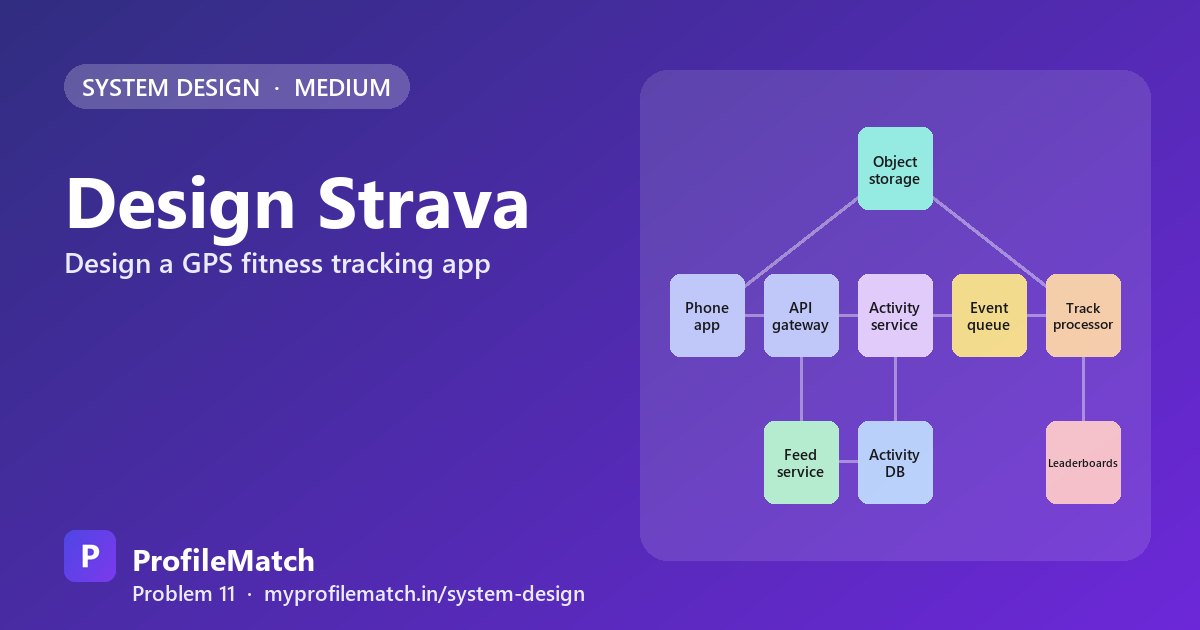
The phone records locally whether or not it has signal. When the athlete finishes and connectivity is available, the app calls the API gateway, and the activity service writes the summary into a Postgres activity database and hands back a pre-signed URL. The app then uploads the full GPS file directly to object storage such as S3, so multi-megabyte payloads never consume capacity on our application servers.
When the upload completes, an event lands on Kafka. Track processors pick it up, load the file from object storage, smooth out noisy or jumpy points, and compare the route against known segments. Every segment the route completes produces an effort, and its time is pushed into leaderboards held in Redis sorted sets. Separately, a feed service assembles each user's feed from recent activities of the athletes they follow, with a cache in front so the 200 ms target holds.
Deep Dive 1 — Storing GPS Data
Storing each GPS point as its own row is the most query-friendly option, but 10 million activities times 3,600 points is about 36 billion new rows every day. Indexes balloon, writes slow down and the bill grows fast. A time-series database is designed for timestamped samples, yet the volume is just as large, and it optimizes for queries we almost never run, such as fetching a single point.
The access pattern settles it: a track is nearly always read in full, to draw a map or to match segments. So each activity becomes one compressed file in object storage. Consecutive GPS samples are only meters apart, so delta encoding, storing each point as a small offset from the one before, typically shrinks files five to ten times.
For feed thumbnails, the full track is overkill. A simplified polyline of a few hundred points is kept directly in the database, so maps render without opening the file. Lifecycle rules move older tracks to cheaper storage classes automatically. One compressed file per activity is cheap, durable and fast to read in one request.
Row per GPS point
- + Easy to query with SQL
- − 36 billion rows a day
- − Huge, slow indexes
Time-series DB
- + Built for timestamped data
- − Still 36B points a day
- − We rarely query one point
File per activityChosen
- + Cheap, durable, compressed
- + One read per activity
- − Not queryable directly
- Compressed file in S3 · delta-encoded points ≈ 5–10× smaller
- Simplified polyline in the DB → fast map previews in the feed
- Old tracks move to cheaper storage tiers automatically
Deep Dive 2 — Live Tracking
Handling 200K live updates per second starts on the device. Instead of transmitting each GPS fix, the app accumulates points and sends a single compact batch roughly every 5 seconds, which saves both battery and mobile data and cuts request volume dramatically.
Those batches hit a stateless live tracking service that verifies a session token so only the athlete can write to their own session. The service stores just the current position and a short trailing window of recent points in Redis, sharded by athlete ID so load spreads evenly. People following along receive new points through server-sent events; since each athlete has only a handful of watchers, the push cost is small.
Every live key carries a TTL, so Redis cleans up after itself once the activity ends. Nothing here needs to be permanent, because the complete, full-resolution track arrives through the normal upload path after the workout.
- 1Batch on the phoneSend points every 5 seconds to save battery
- 2Live serviceStateless; validates the session token
- 3Latest spot in RedisKey per athlete, sharded across a cluster
- 4Update watchersContacts' maps get new points via SSE
- 5Expire when doneA TTL cleans up; the full file arrives later
Deep Dive 3 — Segment Leaderboards
Each upload needs to be checked against a catalog of millions of segments, so brute-force comparison is out. A geo index based on geohashes narrows the search to segments that fall within the route's bounding box, leaving only a few candidates. For each candidate, the processor confirms that the route passed near the segment's start and then its end, in that order, within a tolerance of a few meters.
A successful match produces a segment effort with its elapsed time, written to the database as the source of truth. Each segment also has a Redis sorted set scored by time, and a new score replaces the old one only when it is faster, so the set holds each athlete's personal best. Reading the top ten is then a cheap range query.
Filtered views, such as an age group, a user's friends or only this year, would multiply the number of sorted sets enormously. Those boards are computed from the efforts table when someone asks for them and cached for later requests.
Find nearby segments with a geo index
Search the route's bounding box with geohashes to get a few candidates.
Match the track to each segment
Did the route pass the start and the end, in order, within a few metres?
Save the segment effort
Store the elapsed time in the database: the source of truth.
One sorted set per segment
Keep each athlete's best time only, then read the top ten.
Filtered boards on demand
Age group, friends, this year: computed from efforts and cached.
Trade-offs
Keeping GPS data as files rather than rows is cheap and straightforward, but individual points cannot be queried with SQL. Processing uploads asynchronously makes the upload itself finish immediately, at the cost of leaderboards updating a few seconds later.
Holding live tracking data only in memory keeps that path fast and inexpensive; if a point goes missing, the uploaded file still contains it. Precomputing the main segment boards makes them instant, while rarely used filtered boards are generated on demand and cached. Put briefly: store tracks as files, push heavy work through queues, and rank with sorted sets.
Files vs rows for GPS data
Cheap and simple to store, but you can't query single points with SQL.
Asynchronous processing
Uploads finish instantly, but leaderboards update a few seconds later.
Live data only in memory
Fast and cheap; if a point is lost, the uploaded file still has it.
Precomputed vs on-demand boards
Main boards are instant; filtered boards are computed and cached.
Files for tracks. Queues for heavy work. Sorted sets for ranks.
Key takeaways
- Recorded GPS tracks are write-once blobs: store one compressed file per activity in object storage.
- Keep a simplified polyline in the database so feed maps render without loading the full track.
- Batch live points on the phone and keep only recent positions in Redis with a TTL.
- Use a geohash index to shortlist segments, then match start and end points in order.
- One Redis sorted set per segment holds best times; filtered boards are computed on demand and cached.
Interview questions
Why not store every GPS point as a row in a database?
At an assumed 10 million activities a day with about 3,600 points each, that is roughly 36 billion rows daily, with enormous indexes and slow writes. Tracks are almost always read whole, so one compressed, delta-encoded file per activity in object storage is far cheaper and needs only one read, while a simplified polyline in the database powers map previews.
How does a fitness app handle workouts recorded with no signal?
The app records the full activity on the device and queues the upload until connectivity returns. It assigns a client-side activity ID, so if an upload is interrupted and retried, the server recognizes the same activity instead of creating a duplicate. The GPS file goes directly to object storage through a pre-signed URL once the summary is accepted.
How do you design live location sharing for a running app?
Batch points on the phone and send them every few seconds to a stateless service that validates the session token. Store only the latest position and a short recent trail in Redis, sharded by athlete ID, with a TTL so data expires automatically. Push updates to the few watching contacts with server-sent events, and rely on the later upload for the permanent track.
How are segment leaderboards calculated for running and cycling routes?
After upload, a processor uses a geohash index to find segments inside the route's bounding box, then verifies the route crossed each segment's starting point before its finishing point, allowing a small distance tolerance. Matching efforts are saved to the database and written to a Redis sorted set per segment, keeping only each athlete's best time so the top ten is a quick read.
Why upload GPS files with a pre-signed URL?
A pre-signed URL lets the phone send the large GPS file straight to object storage without routing it through application servers. That keeps API servers small and stateless, avoids paying for bandwidth twice, and lets the storage service handle durability and retries. The activity service only stores the summary and is notified by an event when the upload finishes.
Keep practising
- Learn the building blocks in the free system design course.
- Rehearse answers with system design interview questions.
- See which open jobs fit your skills: upload your resume.