HardProblem 29 of 36 in the system design series
Design a Metrics Monitoring System: Millions of Points Per Second
A metrics monitoring system collects numeric measurements from every server and service in a fleet, such as CPU usage, request rates or error counts, stores them as time series, draws them on dashboards and wakes an engineer when something crosses a threshold. It is the instrument panel that operations teams stare at during an incident.
Interviewers pick this problem because its workload is unusual. Writes vastly outnumber reads, the data is append-only and arrives at regular intervals, and the most important consumer, the alerting engine, must keep working precisely when everything else is on fire. Generic database answers fall apart quickly.
The difficulty lies in three places: absorbing millions of tiny writes every second, storing a year of history without an enormous bill, and evaluating thousands of alert rules quickly and reliably. Each gets its own deep dive, and the overall shape keeps those three concerns on separate paths so that one cannot starve another.
This is an interview practice design for a Metrics Monitoring-like service, built from first principles. It is not a description of how Metrics Monitoring is actually built.
Functional Requirements
Ingestion comes first: services emit data points made of a metric name, a set of tags like host or service, a numeric value and a timestamp. Users then need to query those series over time, filter and group by tags, and compute functions such as averages, sums or the 99th percentile for dashboards.
Alert rules turn queries into automation, for example firing when p99 latency stays above 500 ms for five minutes. When a rule fires, notifications go to the on-call engineer through a paging service, a chat channel or email. Logs and distributed tracing are separate observability pillars with very different data shapes, so they stay out of scope.
Ingest metrics
Services send name, tags, value and timestamp.
cpu{host=a1} 0.72
Query & dashboards
Graph any metric over time, filtered and grouped by tags.
avg · p99 · sum
Alert rules
Conditions like p99 latency above 500 ms for 5 minutes.
threshold + window
Notifications
Page the on-call engineer through PagerDuty, Slack or email.
on-call
- Out of scope: logs and distributed traces
Non-Functional Requirements
Write throughput dominates: millions of points per second, continuously, with reads being a tiny fraction of traffic. Despite that, dashboards for the last few hours should still render in about a second, which means recent data must sit in fast storage.
Alerts must fire within roughly a minute and, critically, must keep firing during the very outages they exist to detect. That pushes the alerting path to be independent from dashboards and long-term storage. Retention should cover a year or more at low cost, which implies aggressive compression and summarising old data rather than keeping every raw point forever.
Huge write throughput
Millions of points per second, all day, every day.
write-heavy
Fast queries
Dashboards for recent hours load in about a second.
< 1 s
Timely, reliable alerts
Alerts fire within a minute, even during outages.
< 1 min
Cheap retention
Keep a year or more of history at low cost.
downsampling
Scale Estimation
Assume 100,000 hosts, each exposing about 500 metrics, which gives 50 million active time series. If every series reports once every 10 seconds, the system receives about 5 million points per second. Over a day's 86,400 seconds that adds up to roughly 432 billion points.
Stored naively at 16 bytes per point, an 8-byte timestamp plus an 8-byte value, that is about 7 TB per day. Specialised time-series compression gets close to 1.4 bytes per point, shrinking the daily footprint to around 600 GB. That twelvefold difference is the main reason to choose a storage engine designed specifically for time series.
50million
Active time series
100K hosts × 500 metrics
5million
Data points per second
one point every 10 s
432billion
Data points per day
5M × 86,400
600GB
Storage per day
≈ 1.4 B / point compressed
Compression turns ≈ 7 TB a day into ≈ 600 GB → use a real TSDB
Core Entities & API
A series is identified by its metric name plus tag set, a data point is a timestamp and value attached to a series, and an alert rule combines a query with a condition and a notification target.
Agents send batches via POST /metrics and receive 202 Accepted immediately; processing happens asynchronously, so agents never block on storage. Dashboards call GET /query, passing an expression, start and end times, and a step that controls point spacing, and receive points per matching series. POST /alerts creates a rule with a query, a comparison operator, a threshold, a for duration and a notification target.
Core entities
Series (name + tags)Data pointAlert rule
API
- POST /metrics [ { name, tags, value, ts }, ... ]→ 202 Accepted
- GET /query ?q=p99:latency{svc=api}&from&to&step→ [ { series, points: [[ts, v]] } ]
- POST /alerts { query, op: >, threshold, for: 5m, notify }→ { rule_id }
High-Level Design
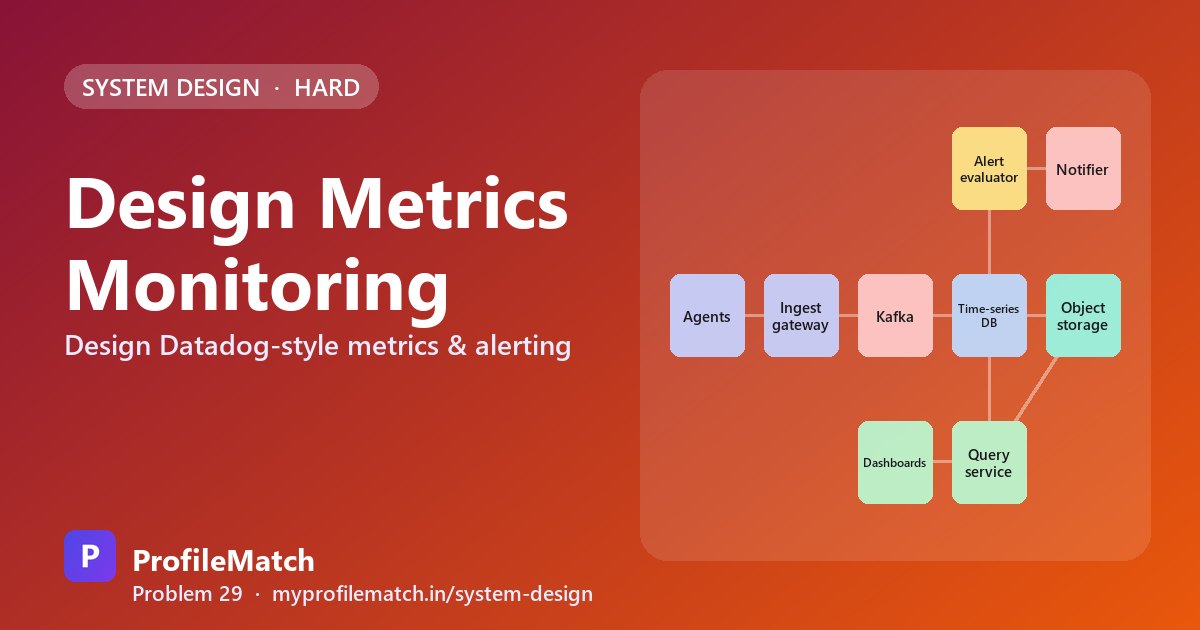
Agents on each host gather metrics locally and push compressed batches every 10 seconds to an ingest gateway, which authenticates the sender and validates the payload. The gateway writes into Kafka, partitioned by series, so traffic bursts are buffered and downstream failures can be recovered by replaying the log.
Ingester processes consume Kafka and append points into a time-series database that holds the most recent hours in memory and on SSD. Older data is compacted into blocks, downsampled and shipped to object storage like S3. A query service serves dashboards by reading hot data from the TSDB and cold data from object storage, then stitching the two together.
Alerting runs as its own component. An evaluator executes each rule against the hot store about every 30 seconds and hands firing alerts to a notifier that pages the right people. Because ingestion, queries and alerting are separate, a heavy dashboard query cannot delay a page, and each path scales independently.
Writes, queries and alerts scale separately → Kafka in the middle
Deep Dive 1 — Ingestion Pipeline
Five million points per second would be impossible if each point were its own HTTP call, so agents accumulate a batch of hundreds of points, compress it and send one request every 10 seconds. Kafka partitions are keyed by a hash of the metric name and tags, which pins each series to a single ingester. Keeping a series on one machine lets that machine compress consecutive points effectively.
Cardinality is the classic way to break such a system. Adding a tag like user_id can turn one metric into millions of distinct series overnight, exhausting memory. Enforcing a per-tenant limit on active series, and rejecting obviously unbounded tags, contains the damage.
Ingesters keep recent points in memory, protect them with a write-ahead log so a crash loses nothing, and flush compressed two-hour blocks to disk. If they fall behind, Kafka simply retains the backlog; rising consumer lag triggers an alert instead of points being silently dropped.
Agents batch and compress
One request every 10 s with hundreds of points, not one call per point.
Kafka partitioned by series ID
Hash of name + tags, so a series always lands on the same ingester.
Guard against cardinality explosions
A tag like user_id creates millions of series; cap series per tenant.
Ingesters buffer in memory
Write-ahead log for safety; flush compressed two-hour blocks to disk.
Backpressure, not data loss
If ingesters fall behind, Kafka holds the data and lag raises an alert.
Deep Dive 2 — Time-Series Storage
A relational database with one row per point is familiar, but at 5 million inserts per second the tables and indexes balloon and write amplification becomes crippling. A wide-column store such as Cassandra handles the write rate, yet offers little time-series-specific compression and is weak at the aggregations dashboards depend on.
A purpose-built TSDB is the chosen option. Since points arrive at near-regular intervals, timestamps are encoded as the difference between successive gaps, often zero, and each value is XORed with the previous one, which yields mostly zero bits for slowly changing metrics. Together these tricks cut storage by roughly twelve times while still allowing fast range scans.
Downsampling handles long retention. Raw points live for 15 days, one-minute rollups for 90 days, and hourly rollups for two years in object storage. Each rollup bucket stores min, max, sum and count, so averages remain exact and a brief spike is still visible in the max even after the raw data is gone.
Relational DB
- + Familiar SQL
- − A row per point is huge
- − Index bloat at 5M writes/s
Wide-column store
- + Handles heavy writes
- − Little time-series compression
- − Weak at aggregations
Purpose-built TSDBChosen
- + ≈ 1.4 B per point
- + Fast range scans
- − One more system to run
- Delta-of-delta timestamps + XOR values → about 12× smaller
- Raw: 15 days · 1-minute: 90 days · 1-hour: 2 years
- Each rollup keeps min, max, sum, count → peaks are not lost
Deep Dive 3 — Alert Evaluation
Consider a rule such as p99 latency greater than 500 ms for five minutes. With thousands of rules across many teams, evaluation is sharded: each evaluator instance owns the subset of rules whose ID hashes to it, so adding instances spreads the load evenly.
Every 30 seconds, an evaluator runs each of its rules against the recent window in the hot store only, so slow reads from object storage can never hold up a page. When the condition first becomes true, the alert enters a pending state and fires only if it remains true for the full duration. That filter removes most noise from momentary blips.
Firing alerts flow to a notifier that groups related alerts, collapses duplicates and honours silences configured during maintenance, so the on-call engineer gets one meaningful page rather than hundreds. The final safeguard is an external heartbeat: a check outside the system expects regular signals from alerting and pages someone if they stop.
- 1Define the rulep99 latency > 500 ms for 5 minutes
- 2Shard the rulesEach evaluator owns a slice of rules by rule ID
- 3Evaluate on scheduleEvery 30 s, query the recent window in the hot store
- 4Pending → firingFire only if true for the whole duration
- 5Group & routeDedup, group and silence, then notify once
- 6Watch the watcherAn outside heartbeat pages if alerting goes silent
Trade-offs
Push-based collection works through firewalls and suits short-lived jobs that may exit before being scraped, while pull-based collection makes it obvious when a target has died because the scrape fails. Downsampling makes years of history affordable, but fine-grained detail disappears once raw data expires.
Placing Kafka between agents and storage adds durability and replay at the cost of a few seconds of extra latency. Alerting by running queries is simple and expressive, but the worst-case alert delay equals ingestion delay plus the evaluation interval. The overall philosophy is to squeeze storage hard, summarise aging data, and give alerting its own independent path.
Push vs pull
Push works behind firewalls and for short jobs; pull spots dead targets easily.
Downsampling
Cheap long history — but old data loses fine detail.
Kafka in the middle
Durable and replayable — but a few more seconds of delay.
Query-based alerting
Simple and flexible — but alert delay = ingest delay + eval interval.
Compress hard. Downsample old data. Keep alerting independent.
Key takeaways
- Assume 50 million series and about 5 million points per second; batch and compress at the agent.
- Partition Kafka by series ID so each series stays on one ingester and compresses well.
- Use a purpose-built TSDB: delta-of-delta timestamps and XOR values cut storage about twelvefold.
- Downsample with min, max, sum and count per bucket so averages and spikes survive.
- Shard alert rules, require a pending duration and add an external heartbeat for the alerter.
Interview questions
How do you handle high-cardinality tags in metrics?
Treat cardinality as a resource with limits. Cap the number of active series each tenant or service may create, reject or strip tags with unbounded values such as user IDs or request IDs, and alert when the rate of new series spikes. High-cardinality data like per-user activity belongs in logs or an analytics store, not in a time-series database.
How do time-series databases compress metric data so well?
They exploit regularity. Timestamps arrive at fixed intervals, so storing the change between successive gaps, often zero, needs only a few bits. Values usually change slowly, so XORing each with the previous one leaves mostly zero bits that encode compactly. Combined, these techniques can bring a 16-byte point down to under 2 bytes on average.
How do you keep downsampled metrics accurate?
Store several aggregates per bucket instead of a single average: minimum, maximum, sum and count. The sum and count let you compute exact averages over any larger range, and the max preserves short spikes that an average would hide. Dashboards then pick the right aggregate depending on what the user is looking at.
What happens if the monitoring system itself goes down?
Design alerting to survive it. Run evaluators and notifiers separately from dashboards and long-term storage, replicate them across zones, and have them read only from the hot store. Add a heartbeat checked by an independent external service so that if alerting goes quiet, someone is paged anyway. Kafka buffering means ingested data is not lost while components recover.
Should a metrics system use push or pull collection?
Both work. Push suits environments behind firewalls or NAT and short-lived jobs that may finish before a scraper visits. Pull gives the server control over load and immediately reveals dead targets because the scrape fails. Large systems often support both, using push gateways for batch jobs and pull for long-running services.
Keep practising
- Learn the building blocks in the free system design course.
- Rehearse answers with system design interview questions.
- See which open jobs fit your skills: upload your resume.