HardProblem 36 of 36 in the system design series
Design GitHub Actions: A CI/CD Platform for Untrusted Code
A CI/CD platform watches a code repository and reacts to what happens there. Push a commit or open a pull request, and within seconds a fleet of machines checks out the code, compiles it, runs the test suite and perhaps deploys the result, while the developer watches the output scroll by and waits for a green tick on the pull request. This article designs a GitHub Actions-like service that offers that experience to millions of repositories.
Under the hood the problem is a distributed job scheduler with some sharp edges. Events must turn into the right set of jobs exactly once. Those jobs execute arbitrary code written by people we do not know, so a careless design could let one customer read another's secrets. Machines are the main cost, which pushes us to recycle them, while security pushes us to throw them away. And every running job produces logs that people want to see live. Interviewers use it to probe scheduling, isolation, fairness and streaming in one question.
This is an interview practice design for a GitHub Actions-like service, built from first principles. It is not a description of how GitHub Actions is actually built.
Functional Requirements
Workflows start from events: a push, a pull request, a cron schedule or a manual dispatch from the UI. Each workflow is defined in a YAML file stored in the repository, made of jobs that contain ordered steps. Jobs can declare needs on other jobs to form a dependency chain, and a matrix expands one job definition into many variants, such as testing on three operating systems and four language versions.
Jobs execute on runners, which are either machines we host or machines the customer registers and operates inside their own network. While a job runs, users watch its logs live; afterwards they can download artifacts like compiled binaries or test reports. The overall result is posted back as a pass or fail check on the pull request, which is what developers look at most.
Trigger on events
Push, pull request, schedule, or a manual run.
on: pushon: pull_request
Run workflows
Jobs from a YAML file, with dependencies and matrices.
needs · matrix
Runners
Run jobs on hosted machines or on the user's own.
hosted · self-hosted
Logs, artifacts & status
Live logs, saved build outputs, and a check on the PR.
✓ or ✗ on the PR
Non-Functional Requirements
Isolation is the first requirement because the platform's entire purpose is to run code from strangers. A job must have no way to observe another tenant's processes, files or secrets. Reliability comes next: each qualifying event should produce exactly one run, and if a runner crashes mid-job the system must detect it instead of leaving a check stuck in the pending state forever.
Start latency shapes the developer experience. Someone waiting on a pull request expects work to begin within about 30 seconds of queueing. Fairness protects the shared fleet: an enterprise that pushes a thousand jobs at once should be capped by per-organisation limits so that a small team's single build is not stuck behind it.
Strong isolation
Untrusted code must never see other customers' jobs or secrets.
security first
No lost runs
Every matching event runs once; a crashed job is detected.
reliable
Fast start
A queued job should start on a runner within seconds.
< 30 s to start
Fair at scale
One huge organisation can't starve everyone else.
per-org limits
Scale Estimation
Assume around 100 million pushes and pull requests per day, which is about 1.2K events per second. A share of them match workflows and produce roughly 20 million jobs daily, or about 230 per second on average and near 1K at peak. If an average job runs for about five minutes, then 230 per second times 300 seconds means roughly 70K jobs are executing at any instant, each needing a dedicated machine.
Logs add up quickly as well. At about 1 MB per job, the platform writes around 20 TB of log data every day, before counting artifacts. These figures make the cost centre obvious: tens of thousands of concurrently running machines. The design must schedule them efficiently, scale the pool up and down quickly, and recycle capacity without ever letting one tenant's leftovers reach the next.
1.2K / sec
Repo events
100M pushes & PRs / day
20million
Jobs per day
≈ 230 / sec · 1K at peak
70K
Jobs running at once
230 / sec × 5 min
20TB
Logs per day
≈ 1 MB per job
Runners are the cost → schedule well, scale fast, recycle safely
Core Entities & API
Four entities structure the system. A Workflow is the YAML definition, a Run is one execution of it triggered by an event, a Job is a unit of work inside a run, and a Runner is the machine that executes jobs. Runs and jobs carry state such as queued, in progress, succeeded or failed.
The Git service posts every repository event to POST /events with the repo, event type, ref and commit SHA. Users can trigger a run manually through POST /workflows/{id}/dispatches with a branch and inputs. Runners fetch work through GET /runner/jobs?wait=50s, a long poll that holds the request open until a job is available and returns the job definition plus a short-lived job_token. Browsers call GET /jobs/{id}/logs to follow output as it is produced.
Core entities
WorkflowRunJobRunner
API
- POST /events (from Git) { repo, type, ref, sha }→ runs created
- POST /workflows/{id}/dispatches { ref, inputs }→ 204 run queued
- GET /runner/jobs?wait=50s→ { job, steps, job_token }
- GET /jobs/{id}/logs→ live log stream
High-Level Design
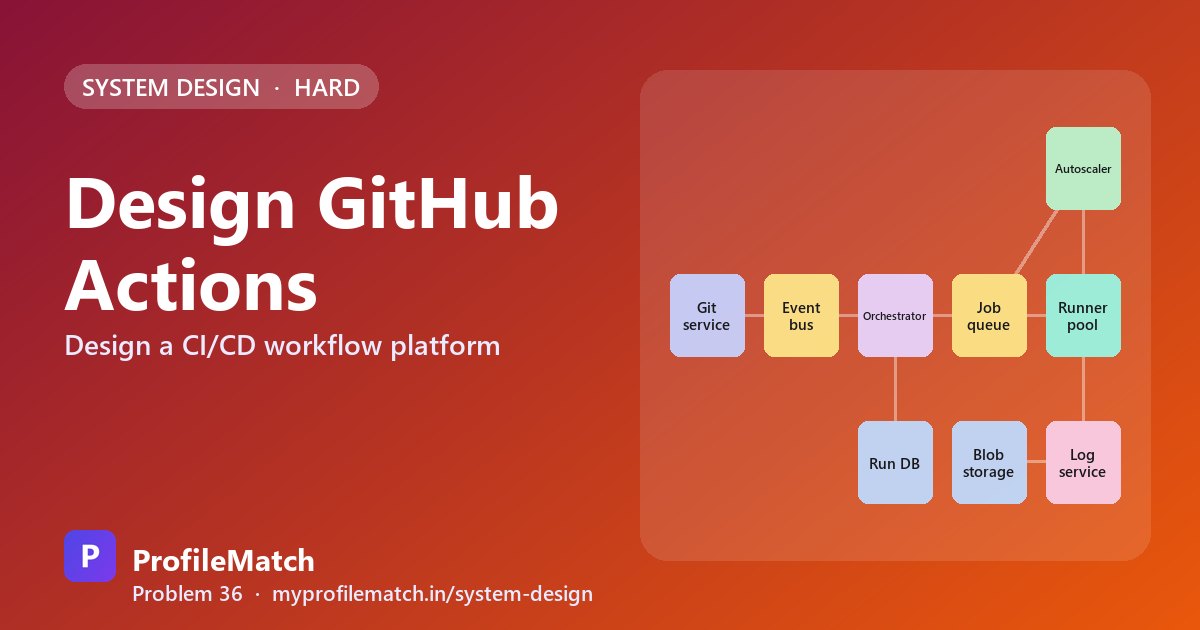
Each push or pull request in the Git service is published to Kafka, which acts as a durable event bus so nothing is dropped if a downstream component restarts. The orchestrator consumes these events, locates the workflow files whose triggers match, and expands them into a run containing jobs. All run and job state is persisted in the run database.
Jobs whose dependencies are satisfied are placed in a job queue partitioned by runner label, for example ubuntu, windows or a customer's self-hosted pool. Runners long-poll the queue for their label, take a job, execute its steps in order and report the outcome. An autoscaler monitors queue depth, booting more runner VMs when jobs start to wait and shrinking the pool when demand falls.
During execution, the runner sends log lines to the log service, which streams them to anyone watching and eventually persists them, together with uploaded artifacts, in blob storage. Keeping this traffic on its own path means a burst of noisy builds cannot slow down scheduling.
Deep Dive 1 — Events to Jobs
Kafka may deliver an event more than once, so the orchestrator first deduplicates on the event's delivery ID; a single push must yield a single run. It then reads the workflow files exactly as they exist at the triggering commit, not at the branch head, and evaluates their trigger filters such as branch patterns and changed file paths.
Matching workflows are expanded into a job graph. A matrix of three operating systems by four versions becomes twelve independent jobs, while a job declaring needs stays blocked until its prerequisites succeed. Only jobs with no unfinished dependencies are enqueued, and each organisation's concurrency limit is applied at this point. When a newer push lands on the same branch, the older run can be cancelled to avoid wasting runners on stale code.
As jobs complete, the orchestrator unblocks and enqueues their dependents. Every running job holds a lease that the runner renews with heartbeats; if the heartbeats stop, the lease expires and the job is retried or marked failed, so a crashed machine never leaves a run hanging.
- 1Receive the eventDurable in Kafka; dedupe by delivery ID
- 2Match workflowsRead YAML at that commit; check branch and path filters
- 3Build the job graphExpand matrices; jobs wait on their 'needs'
- 4Enqueue fairlyPer-org concurrency limits; cancel outdated runs
- 5Advance on finishStart dependents; leases catch dead runners
Deep Dive 2 — Runners & Isolation
A small fleet of long-lived machines that run job after job gives instant starts, but files, caches and stray processes from one customer can be found by the next, which is unacceptable for untrusted code. Containers on a shared host are fast and pack densely, yet every container shares the host kernel, so a single kernel exploit could cross tenant boundaries.
A fresh virtual machine for every job, destroyed when the job ends, provides hardware-level isolation and a guaranteed clean environment, so it is the chosen option. Its weakness is boot time. The autoscaler counters that with a warm pool of pre-booted VMs per runner label, sized from recent demand, so a queued job is assigned to an already running machine in seconds.
Each secret is delivered solely to the job that references it, and any occurrence of its value in log output is replaced with asterisks. For deployments to cloud providers, jobs exchange a signed identity for short-lived OIDC credentials, which removes the need to store long-lived cloud keys in the platform at all.
Shared long-lived box
- + Instant start
- − Files leak between jobs
- − Unsafe for strangers
Containers, one host
- + Fast and dense
- − Shared kernel
- − Weaker isolation
Fresh VM per jobChosen
- + Strong isolation
- + Clean machine every time
- − Slow boot → warm pool
- Warm pool of pre-booted VMs per label → jobs start in seconds
- Secrets: injected per job, masked in logs; short-lived OIDC tokens for clouds
Deep Dive 3 — Logs & Artifacts
Runners batch log output into small chunks and send one roughly every second. The log service fans each chunk out to anyone currently viewing that job, giving the browser a near-live stream. When the job finishes, the chunks are assembled into one file per step and written to blob storage, after which the in-memory live buffer can be released.
Artifacts can reach hundreds of megabytes, so runners request a signed URL and upload directly to blob storage rather than streaming bytes through the API tier. A dependency cache whose key is derived from hashing the lock file lets later builds restore packages instead of downloading them again, which shortens jobs and reduces runner minutes. Retention rules delete logs and artifacts after a period such as 90 days; without them, 20 TB per day would grow without limit.
Stream logs in small chunks
The runner sends batches every second or so; viewers get them live.
Store finished logs in blob storage
Chunks are combined into one file per step when the job ends.
Upload artifacts with signed URLs
Big files go straight to blob storage, not through our API.
Cache dependencies
Keyed by a hash of the lock file, so builds skip re-downloading.
Retention limits
Delete logs and artifacts after, say, ninety days.
Trade-offs
Fresh VMs are far safer than containers, at the price of higher cost per job and slower cold starts. The size of the warm pool trades start latency against paying for idle machines. Long polling lets self-hosted runners behind corporate firewalls work with only outbound connections, though it adds a little delay compared with pushing work to them.
Retention length balances debugging value against steadily rising storage bills. The overall philosophy: keep events durable, apply fairness in the queues, treat machines as disposable, and move log handling off the critical path of job execution.
Fresh VMs vs containers
Much safer, but each job costs more and boots slower.
Warm pool size
Bigger pool means faster starts, but we pay for idle machines.
Long poll vs push to runners
Works behind firewalls for self-hosted runners, but adds some delay.
Retention period
Longer history helps debugging, but storage costs keep growing.
Durable events. Fair queues. Throwaway machines. Logs off the hot path.
Key takeaways
- A CI/CD platform is a distributed job scheduler that runs code from strangers.
- Dedupe events by delivery ID, read workflow YAML at the commit, and build a job graph.
- Enforce per-organisation concurrency limits and cancel outdated runs on the same branch.
- Use a fresh VM per job for isolation and a warm pool per label for fast starts.
- Stream logs in chunks, store them in blob storage, and upload artifacts via signed URLs.
Interview questions
How does a CI/CD system like GitHub Actions turn a push into jobs?
In this practice design the push becomes an event on a durable bus such as Kafka. An orchestrator deduplicates it, reads workflow YAML at that commit, checks trigger filters, expands matrices into individual jobs and builds a dependency graph. Jobs with no pending dependencies go into a queue for their runner label, and later jobs are released as earlier ones finish.
How do CI platforms run untrusted code safely?
Each job runs in a fresh virtual machine that is destroyed afterwards, so no files or processes survive between tenants and there is no shared kernel to attack. Secrets reach only the job that references them and are redacted from log output, and cloud access uses short-lived OIDC tokens instead of stored long-lived keys.
Why do CI runners poll for jobs instead of receiving pushed work?
Self-hosted runners often sit behind corporate firewalls or NAT that block inbound connections. With long polling, the runner opens an outbound HTTPS request that the server holds until a job is ready, which works almost anywhere. The cost is a small amount of extra latency compared with pushing jobs directly to a reachable machine.
How can jobs start quickly if each one gets a new VM?
The autoscaler maintains a reserve of already-booted virtual machines for every runner label, sized from recent demand and queue depth. A newly queued job is handed to an already running VM, so it starts within seconds. After the job, that VM is destroyed and a replacement boots in the background to refill the pool.
How are live build logs streamed to the browser?
The runner sends log output in small chunks about once per second to a log service, which forwards each chunk to everyone watching that job. When the job completes, chunks are merged per step into a single file that is written to blob storage, and the live buffer is freed. Retention rules later delete old logs to control storage cost.
Keep practising
- Learn the building blocks in the free system design course.
- Rehearse answers with system design interview questions.
- See which open jobs fit your skills: upload your resume.