MediumProblem 33 of 36 in the system design series
Design a Food Review App: Geo Search, Ratings and Photos
A food review app helps hungry people decide where to eat. Someone opens it at lunchtime, looks for biryani within a few kilometres, compares star ratings, skims a handful of reviews and scrolls through photos of the dishes. The practice design here covers a Zomato-style service that supports exactly that loop, plus the other side of it: diners posting their own reviews and pictures afterwards.
It is a popular medium-level interview question because a small feature list hides three distinct problems. Search has to combine distance with cuisine, price and rating filters and still answer in a fraction of a second. Average ratings must stay correct while a million new reviews arrive every day, without recomputing anything expensive on each page load. And the app accumulates roughly a terabyte of images daily, which has to be stored cheaply and delivered quickly to phones around the country. A good answer separates the read path from the write path and picks the right store for each kind of data.
This is an interview practice design for a Food Review App-like service, built from first principles. It is not a description of how Food Review App is actually built.
Functional Requirements
Search comes first. A user should be able to find restaurants by location, cuisine, name and minimum rating, so a query like "South Indian within 3 km, 4 stars and up" works naturally. Tapping a result opens a restaurant page with its details, its current average rating, the latest reviews and a gallery of photos. This page is by far the most viewed screen, which is why it is tagged read-heavy.
On the contribution side, a signed-in diner can post a review made of a star rating from one to five and some text, and can attach food photos to it. Delivery, table reservations and payments are separate products with their own hard problems, so they are excluded to keep the discussion focused on discovery and reviews.
Search restaurants
By location, cuisine, name and rating.
near mefilters
Restaurant page
Details, average rating, recent reviews and photos.
read-heavy
Write a review
Give a rating from one to five, with text.
1–5 stars
Upload photos
Add food photos to a review.
images
- Out of scope today: food delivery, table booking and payments
Non-Functional Requirements
Search should return within about 300 milliseconds, quick enough to refresh results as filters change. Availability needs to be at least 99.9%, and the traffic pattern explains why: demand spikes around lunch and dinner, exactly when an outage would frustrate the most people.
Ratings, on the other hand, can be eventually consistent. If a fresh review takes a few seconds to move the displayed average, no one is harmed, and accepting that delay lets us update the search index asynchronously. Media storage must scale to millions of photos at low cost per gigabyte while still loading quickly on mobile networks, which points toward object storage and a CDN rather than the main database.
Fast search
Results should feel instant while the user types.
< 300 ms
Highly available
People search at lunch and dinner; we can't be down.
99.9%+
Eventually consistent
A new review can take a few seconds to show in ratings.
seconds is fine
Scalable media
Store and serve millions of photos cheaply.
object storage
Scale Estimation
Assume about 1 million restaurants and around 20 million daily users who together generate roughly 100 million searches and page views a day. That averages near 1.2K requests per second, with peaks of about 5K at mealtimes. Reviews are far rarer: assume around 1 million per day, or about 12 per second.
Photos dominate storage. With roughly 500K uploads a day at about 2 MB each, the system adds close to 1 TB of images daily, which rules out keeping them in a relational database. The more important ratio is reads to writes, which is about 100 to 1. That tells us to invest in indexing and caching the read path, while writes can take a simple, transactional route.
1million
Restaurants
1.2K / sec
Searches & page views
100M / day · ≈ 5K peak
1million
New reviews per day
≈ 12 per second
1TB
New photos per day
500K photos × 2 MB
About 100 reads for every write → index and cache the read path
Core Entities & API
The core entities are Restaurant, Review, Photo and User. A review belongs to one restaurant and one user, and it can reference several photos. Photos are created first and linked by ID, which keeps the review request small and lets uploads happen in parallel while the user is still typing.
GET /search accepts latitude, longitude, cuisine and a free-text query and returns a ranked list of restaurants. GET /restaurants/{id} returns the restaurant profile, its current average and an initial batch of reviews. POST /restaurants/{id}/reviews takes a rating, text and an array of photo IDs. POST /photos/upload-url returns a photo ID and a short-lived signed URL, so the image bytes go directly to storage instead of through the API tier.
Core entities
RestaurantReviewPhotoUser
API
- GET /search?lat&lng&cuisine&q→ { restaurants[] }
- GET /restaurants/{id}→ { details, rating, reviews[] }
- POST /restaurants/{id}/reviews { rating, text, photo_ids[] }→ { review_id }
- POST /photos/upload-url { content_type }→ { photo_id, upload_url }
High-Level Design
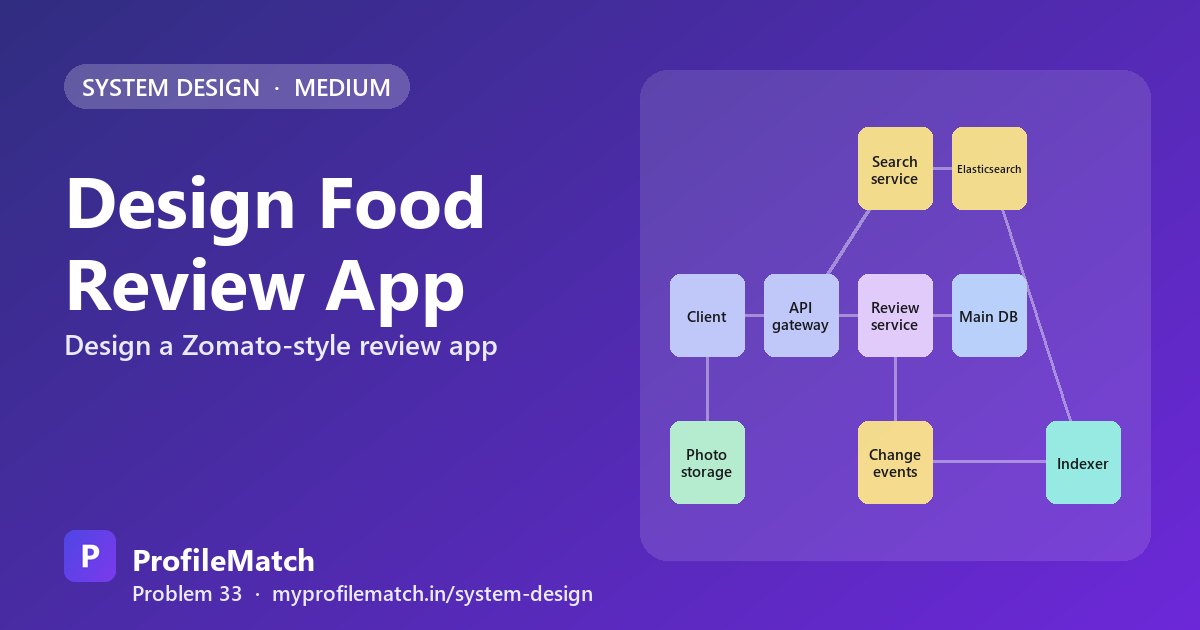
Every request lands on a gateway layer, where the caller is identified and the call is forwarded to the matching service. Search queries go to a search service backed by Elasticsearch, where every restaurant is a document with its coordinates, cuisine tags and current rating. Review submissions go to a review service, which writes to Postgres and adjusts the restaurant's rating fields inside the same transaction, so the database always holds a consistent view.
Each committed review also emits a change event to Kafka. An indexer consumes those events and refreshes the corresponding Elasticsearch document a few seconds later. Images bypass the backend completely: clients upload them to S3 and everyone else downloads them through the CDN. The result is two independent paths, one tuned for queries and one for durable writes, and each can be scaled without touching the other.
Search reads from the index. Writes go to the database.
Deep Dive 1 — Search by Location
Each restaurant document in Elasticsearch carries a geo_point for its location along with cuisine, price band, rating and the name as analysed text. A search first applies a geo-distance filter, for example a 5 km radius around the user, which the engine resolves quickly using its spatial index rather than checking every restaurant in the country.
User filters come next: cuisine, open now, minimum rating and price range narrow the candidate set. The survivors are then scored with a blend of distance, rating and popularity. Pure distance would always put the nearest place first; blending lets an excellent restaurant 2 km away rank above a mediocre one across the street, which is usually what diners want.
Freshness is handled by the Kafka pipeline, so new listings, menu edits and rating changes reach the index within seconds. Because most searches stay inside one city, sharding the index by city keeps queries local and balanced, and short-lived caching of popular searches, such as "pizza" in a dense neighbourhood, removes repeated work at peak hours.
- 1Index restaurantsgeo_point, cuisine, price, rating, name text
- 2Filter by distanceOnly restaurants within, say, five kilometres
- 3Apply filtersCuisine, open now, rating 4+, price range
- 4Rank the resultsMix of distance, rating and popularity
- 5Keep the index freshKafka events update it within seconds
- Shard the index by city; cache popular searches for a short time
Deep Dive 2 — Rating Aggregation
Computing the average from all reviews whenever a page opens is always exact, but a popular restaurant may have thousands of reviews, and scanning them on every view wastes the database at 5K requests per second. A nightly batch job is cheap but leaves ratings up to a day old, and someone who just posted a review sees no change, which feels broken.
The chosen approach stores a running rating_sum and review_count on the restaurant row and updates both in the same transaction as the review insert. Reading the average is a single division. Edits and deletes need care: changing a review from 3 stars to 5 adds 2 to the sum, while a deletion subtracts the old rating and decrements the count.
Raw averages make poor ranking signals because a single five-star review would outrank a place with a thousand reviews averaging 4.6. Ranking therefore uses a Bayesian average, which blends each restaurant's ratings with the city-wide mean, so places with little evidence start near the average and move away only as reviews accumulate.
Average on every read
- + Always exact
- − Scans all reviews
- − Slow for popular places
Nightly batch job
- + Cheap to run
- − Ratings a day stale
- − New reviews feel ignored
Running sum + countChosen
- + One-row update per review
- + Instant average on read
- − Must handle edits
- Edit 3★ → 5★: add 2 to the sum; delete: subtract rating, count − 1
- Rank with a Bayesian average: few reviews pull toward the city average
Deep Dive 3 — Photo Uploads
Uploads start with the client requesting a pre-signed URL, then sending the file directly to S3. Large images never consume app server bandwidth or memory, so the API tier stays small. When the object lands, a storage event triggers a background worker that generates resized versions and thumbnails and removes embedded GPS metadata to protect the uploader's privacy.
An automated moderation step screens each image for unsafe content. Until it passes, the photo stays in a pending state and is visible only to its author. Approved images are served via a CDN using versioned URLs, which allows very long cache lifetimes because a changed image simply gets a new address.
Most photos are viewed heavily for a short time and then rarely. Lifecycle rules move older, seldom-requested originals to cheaper storage classes, keeping the cost of that daily terabyte under control while thumbnails and recent images stay in the faster tier.
Pre-signed upload URL
The client uploads straight to S3; our servers never touch the bytes.
Process in the background
An S3 event triggers resizing, thumbnails and removing location data.
Moderate before showing
Automatic checks for unsafe images; status stays pending until done.
Serve through a CDN
Versioned URLs, cached at the edge for a long time.
Tier old photos
Rarely viewed originals move to cheaper storage classes.
Trade-offs
A dedicated search index gives fast, flexible geo and text queries, but it trails the database by a few seconds. Running sums make averages instant, at the cost of careful logic for edits and deletes. Direct-to-S3 uploads keep servers lean but mean validation and processing happen only after the file has arrived.
Caching restaurant pages makes the hottest screen very fast, while a new review may take a short while to appear for other viewers. Each compromise accepts a little staleness in exchange for speed, consistent with the eventual consistency the requirements already allow: query an index, maintain ratings at write time, and keep media away from the application servers.
Separate search index
Fast, flexible search, but data is a few seconds behind the database.
Running sum vs recompute
Instant averages, but edits and deletes must be handled carefully.
Direct upload to S3
Our servers stay light, but we must validate files after upload.
Caching restaurant pages
Very fast reads, but new reviews appear a little later.
Index for search. Aggregate on write. Keep photos off your servers.
Key takeaways
- Reads outnumber writes about 100 to 1, so index and cache the read path heavily.
- Use Elasticsearch geo-distance filters plus cuisine and rating filters, sharded by city.
- Keep a running rating sum and count per restaurant; rank with a Bayesian average.
- Send photos straight to S3 with pre-signed URLs, process them async, and serve via CDN.
- Kafka change events keep the search index a few seconds behind the database.
Interview questions
How does a food app find restaurants near me?
Restaurants are indexed in a search engine such as Elasticsearch with a geo point for each location. A query applies a distance filter around the user's coordinates, then cuisine, price, rating and open-now filters, and finally ranks the remaining places by a mix of distance, rating and popularity. Sharding the index by city keeps each query small.
How do review apps calculate the average rating quickly?
Each restaurant row stores a running sum of ratings and a review count. When a review is added, both values change in the same database transaction, so the average is just the sum divided by the count at read time. Edits adjust the sum by the difference, and deletions subtract the rating and lower the count.
What is a Bayesian average and why use it for restaurant ranking?
A Bayesian average mixes a restaurant's own ratings with a prior, typically the average rating across its city. With few reviews the result stays close to that prior; with many reviews it approaches the restaurant's true average. This stops a place with one perfect review from outranking a well-loved restaurant with hundreds of strong reviews.
Why upload photos with pre-signed S3 URLs instead of through the API?
Routing multi-megabyte images through application servers wastes their bandwidth and memory and slows other requests. A pre-signed URL lets the client upload directly to object storage with a short-lived permission. The backend only handles metadata, while an event-driven worker processes, resizes and moderates the image once it lands.
How do you keep the search index in sync with the database?
Every change to restaurants or reviews is committed to Postgres first, then published as an event to Kafka. An indexer service consumes these events and updates the matching Elasticsearch documents, usually within a few seconds. The index is eventually consistent, which is acceptable because a slightly delayed rating does not harm users.
Keep practising
- Learn the building blocks in the free system design course.
- Rehearse answers with system design interview questions.
- See which open jobs fit your skills: upload your resume.